It is 21:45 on a Saturday evening. I am the only person actively online in the house. My phone is the only device I am using. The kids’ tablets are on charge, and the Alexa speakers are idle.
Or so I thought.
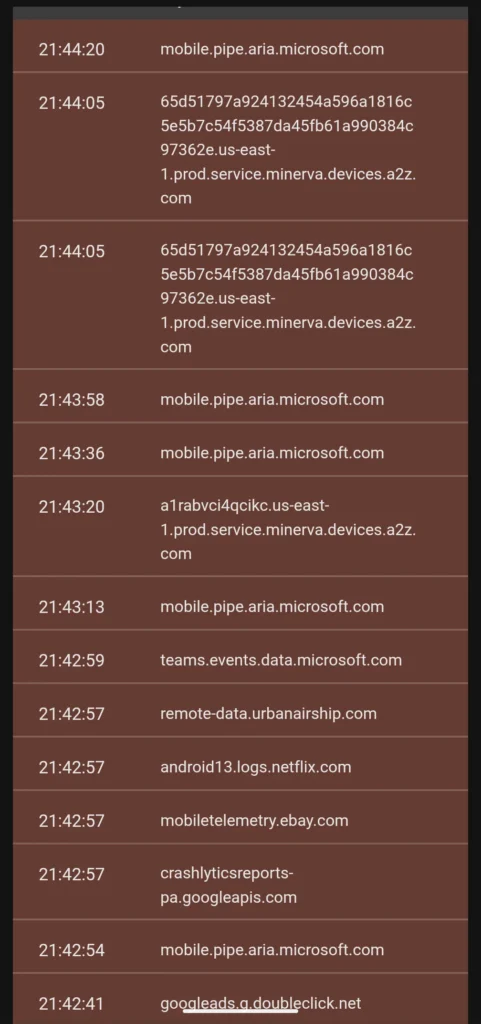
My AdGuard Home query log tells a different story.
In the space of a few minutes, my DNS filter has blocked requests to mobile.pipe.aria.microsoft.com, teams.events.data.microsoft.com, android13.logs.netflix.com, mobiletelemetry.ebay.com, remote-data.urbanairship.com, and multiple Amazon Alexa endpoints.
Nobody opened an app. Nobody asked for anything. These requests just happened.
This is the background noise of a modern home network.
The Devices You Are Not Using
Microsoft is the most persistent. mobile.pipe.aria.microsoft.com is their telemetry pipeline. The source is my son’s Samsung tablet. I have not installed Microsoft apps on it. I have removed what I can via ADB. It does not matter. Samsung ships OneDrive and related components baked into the system. Remove the app, and parts of the behaviour remain.
Amazon is next. Those long hashed domains resolving to *.prod.service.minerva.devices.a2z.com are Alexa. Nobody is speaking to it. It is just there, checking in.
I stopped using Alexa directly after the recording policy changes. The rest of the house still relies on it, so I have compromised. I route everything through Home Assistant. I even have a physical button on my desk that toggles a radio station. No voice needed. It feels slightly absurd, but it works.
Netflix, eBay, and Crashlytics are all present too. Apps installed, not open, still reporting. Crashlytics in particular is worth noting. It is embedded in other apps, so you do not install it directly. It just appears as a side effect.
Earlier in the Day
This is not limited to idle devices.
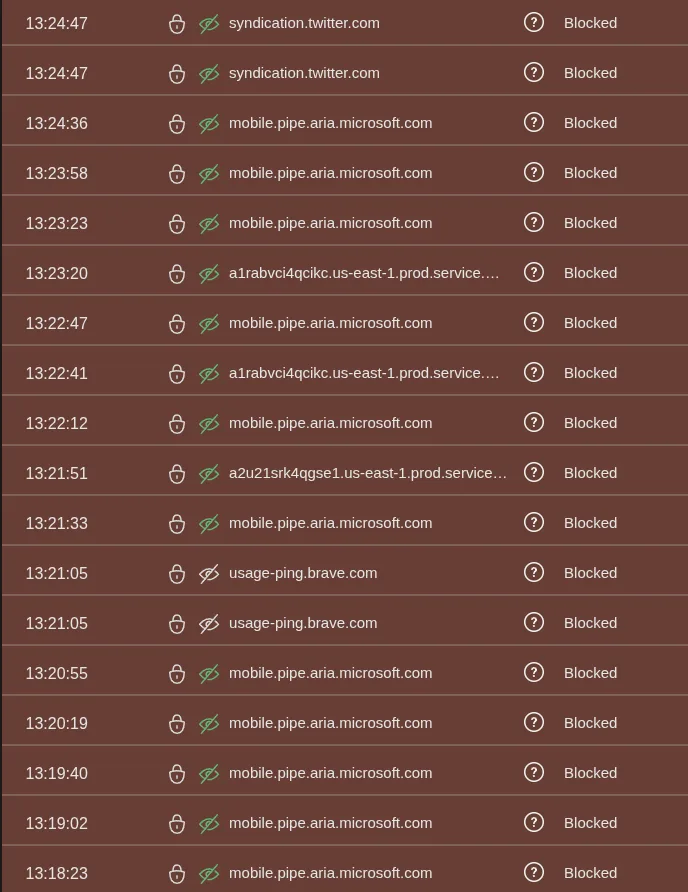
Earlier, my logs showed repeated requests to syndication.twitter.com and usage-ping.brave.com.
I do not use Twitter. I do not have an account. Yet it still appears in my logs because of embedded widgets on sites I visit.
As for Brave — I use it because it works. It is Chromium-based, extensions just work, and syncing is painless. I have tried Firefox again recently, but the mobile experience and sync did not click for me. That said, I do not fully trust Brave either. The usage-ping.brave.com entry is proof of that.
Nothing gets a free pass on my network.
“Just Install a Firewall”
You can install a firewall on a tablet. Technically.
In practice, it is inconsistent, often limited without root, and completely absent on devices like Alexa. It also does nothing for other people in the house who just want their device to work.
A DNS-level approach solves that.
Every device, regardless of OS, ability, or user awareness, is covered. The request never leaves the network. No prompts, no decisions, no trusting a binary you cannot inspect.
Just silence.
Why This Matters
This is not about extreme setups or niche edge cases.
This is a normal household:
- A tablet for the kids
- Alexa for music
- Streaming apps installed
- A browser that “just works”
And yet, even when nobody is actively using anything, the network is busy.
Constantly.
If you want the full breakdown of how my DNS setup works — the three AdGuard instances, OpenWrt, and failover, I covered that here: The DNS Safety Net
This post is not about how it works.
It is about what it reveals.
The Quiet Network
None of this traffic is visible without looking for it.
There are no notifications. No warnings. No indication that anything is happening at all.
Unless you put something in the way.
My network is quiet.
My logs are not.